Compliance
SMS Opt-In & Consent
How drivers consent to receive transactional SMS messages from ValveRide Flow, including opt-in, opt-out, and message frequency disclosures.
Last updated: May 1, 2026
1. Who Receives Messages
Recipients are commercial truck drivers employed by fleet companies that have purchased a subscription to ValveRide Flow at valverideflow.com. Messages are not sent to consumers, and ValveRide Flow does not market to or message the general public. There is no direct-to-consumer signup for SMS.
2. Visual Walkthrough of the Opt-In Flow
Drivers cannot enroll themselves. The opt-in flow is employer-initiated by an authorized fleet dispatcher, then driver-confirmed by SMS reply. The four steps below show the actual screens involved, in order.
An authorized dispatcher signs in to the ValveRide Flow tenant portal at app.valverideflow.com and opens the Drivers screen. Only authenticated fleet administrators with valid credentials can reach this page; the portal is not publicly accessible.
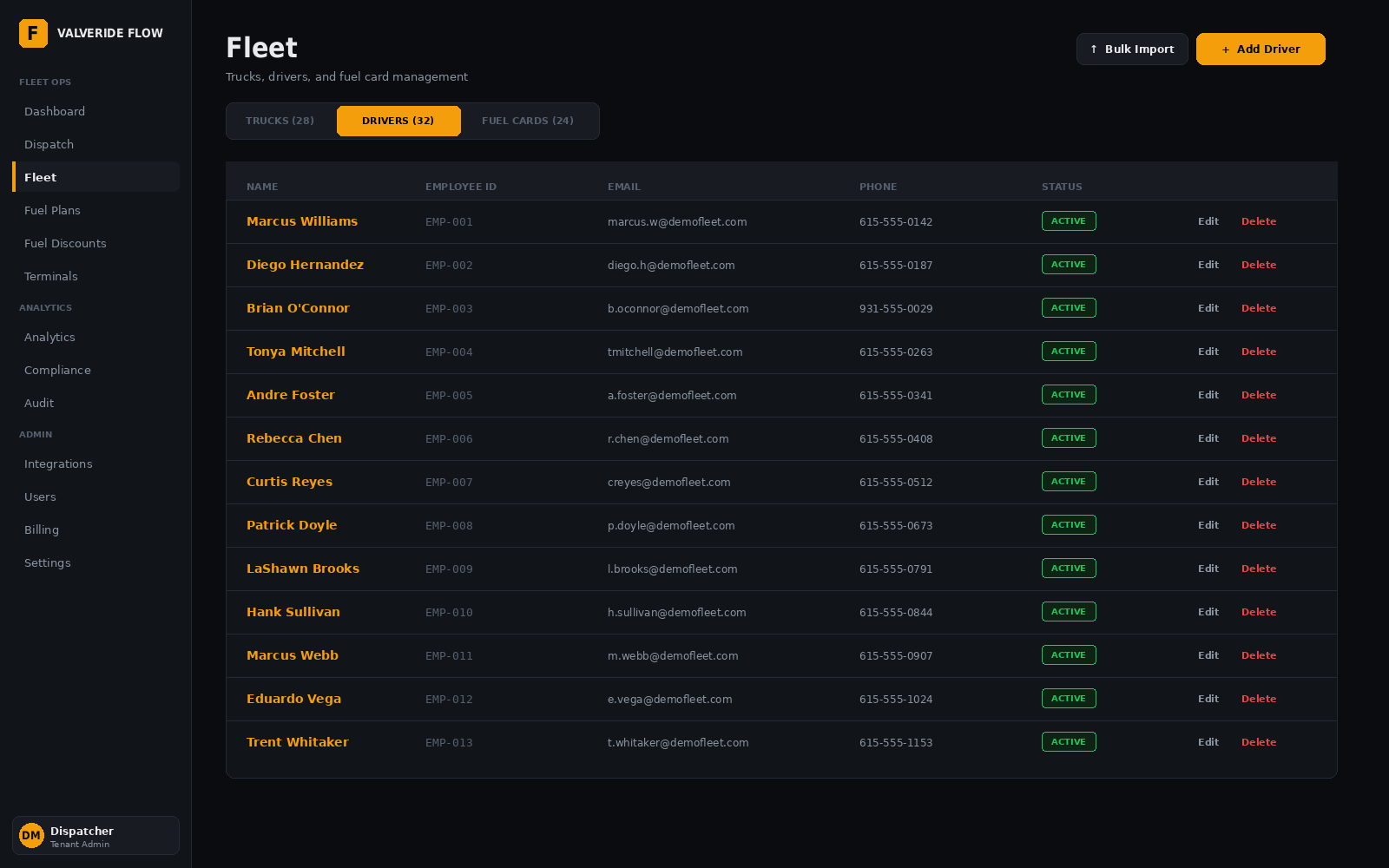
The Drivers screen, where the dispatcher initiates enrollment by clicking “+ Add Driver” (top right).
When a mobile number is entered on the Add Driver form, the dispatcher must affirm a consent attestation before the “Save Driver” button is enabled. The attestation states that the driver is an employee or authorized operator of the fleet, that the dispatcher has the driver’s permission to enroll the number for transactional SMS, and that the number provided is the driver’s own mobile number. The checkbox is not pre-selected and is only enabled when the dispatcher actively chooses to confirm. The attestation, the dispatcher’s identity, and the timestamp are stored in our compliance audit log.
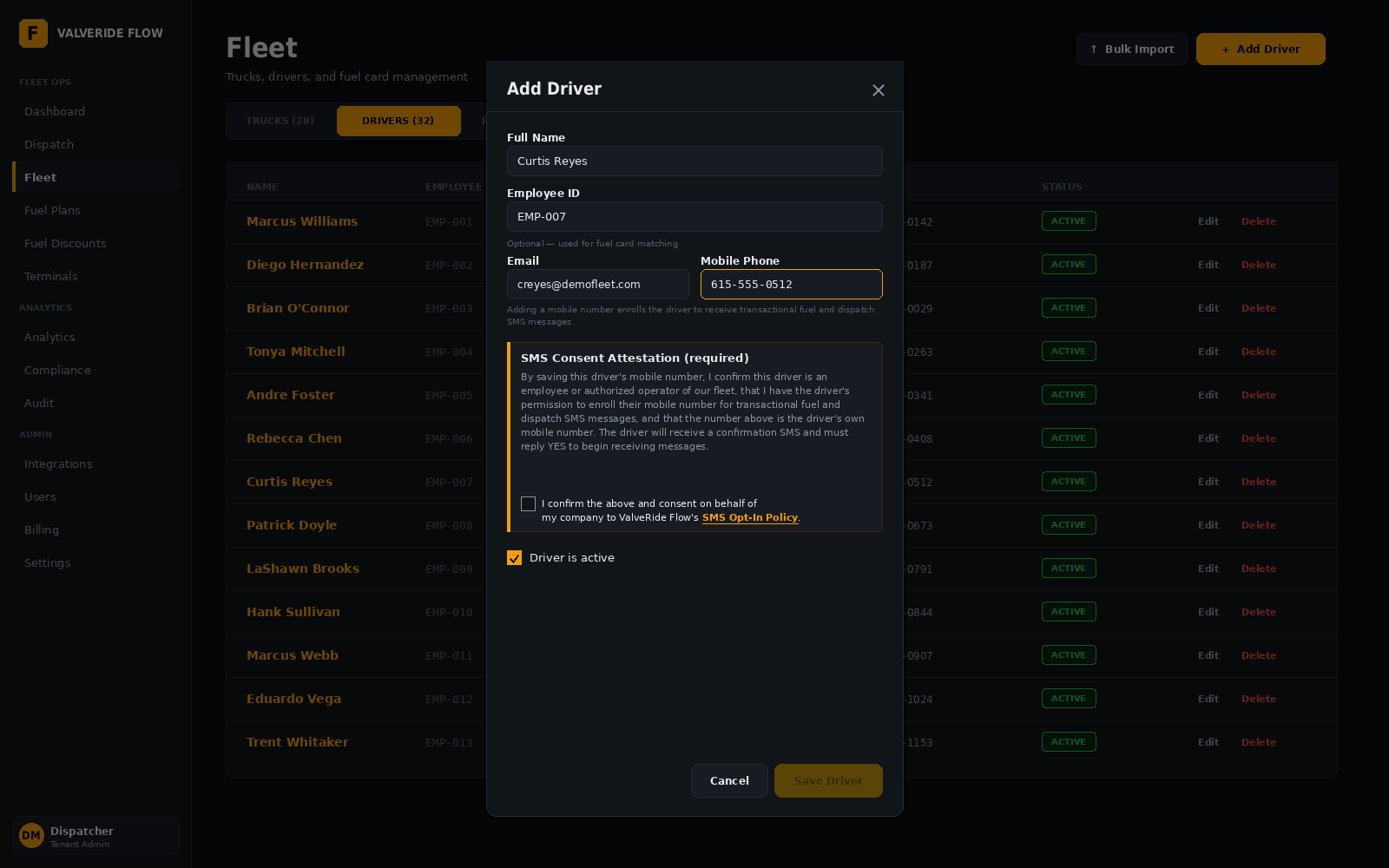
The Add Driver form. The amber-bordered “SMS Consent Attestation (required)” block is shown whenever a mobile number is being entered. “Save Driver” is disabled until the dispatcher checks the box.
Within seconds of the dispatcher saving the form, ValveRide Flow sends a single confirmation SMS to the enrolled number. No further messages are sent until the driver replies YES.
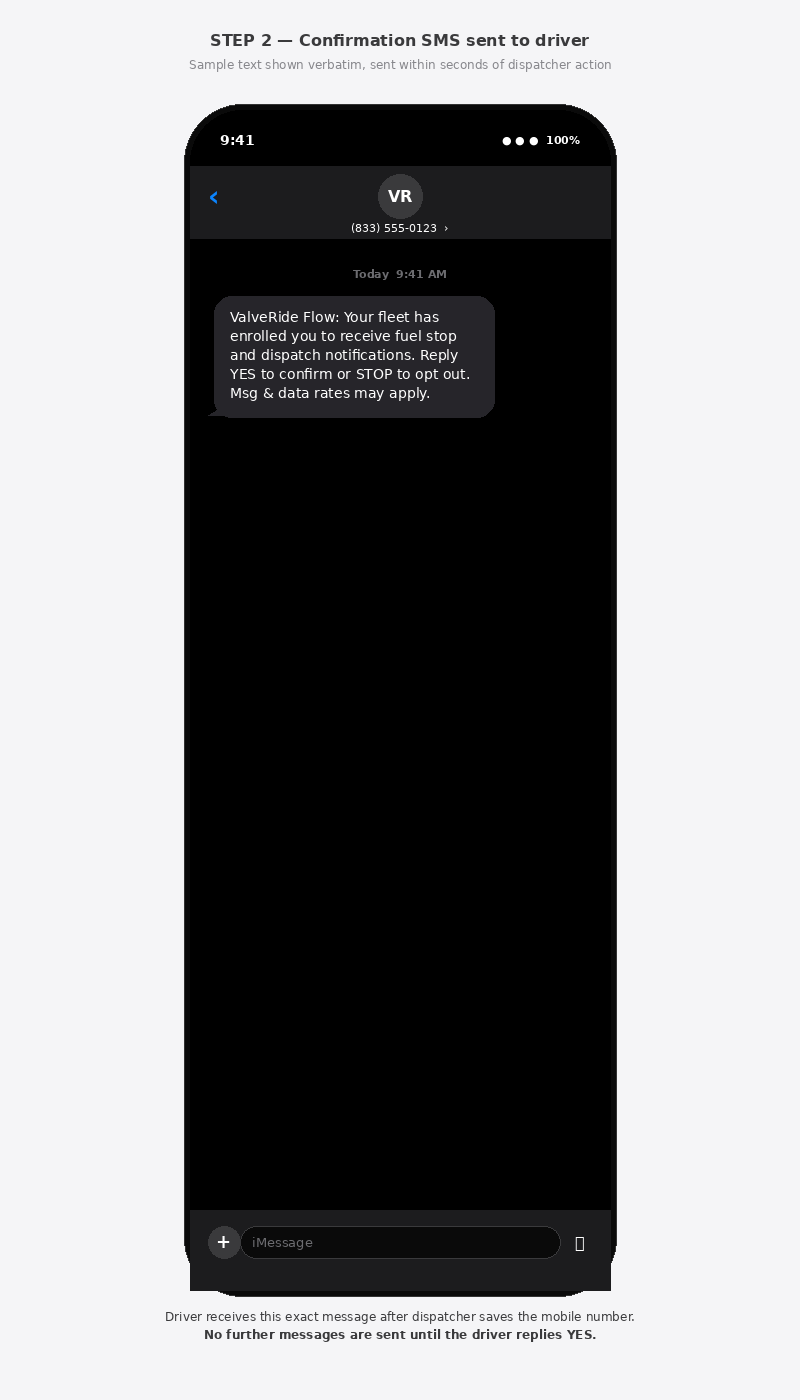
The exact opt-in message every newly-enrolled driver receives. Sender shortcode shown is illustrative.
Only after the driver replies YES from their own handset does the system mark the driver as opted-in and begin sending transactional fuel and dispatch messages. The reply, the timestamp, and the originating phone number are persisted in our audit log as proof of consent. Drivers who do not reply YES, or who reply STOP, never receive any further messages.
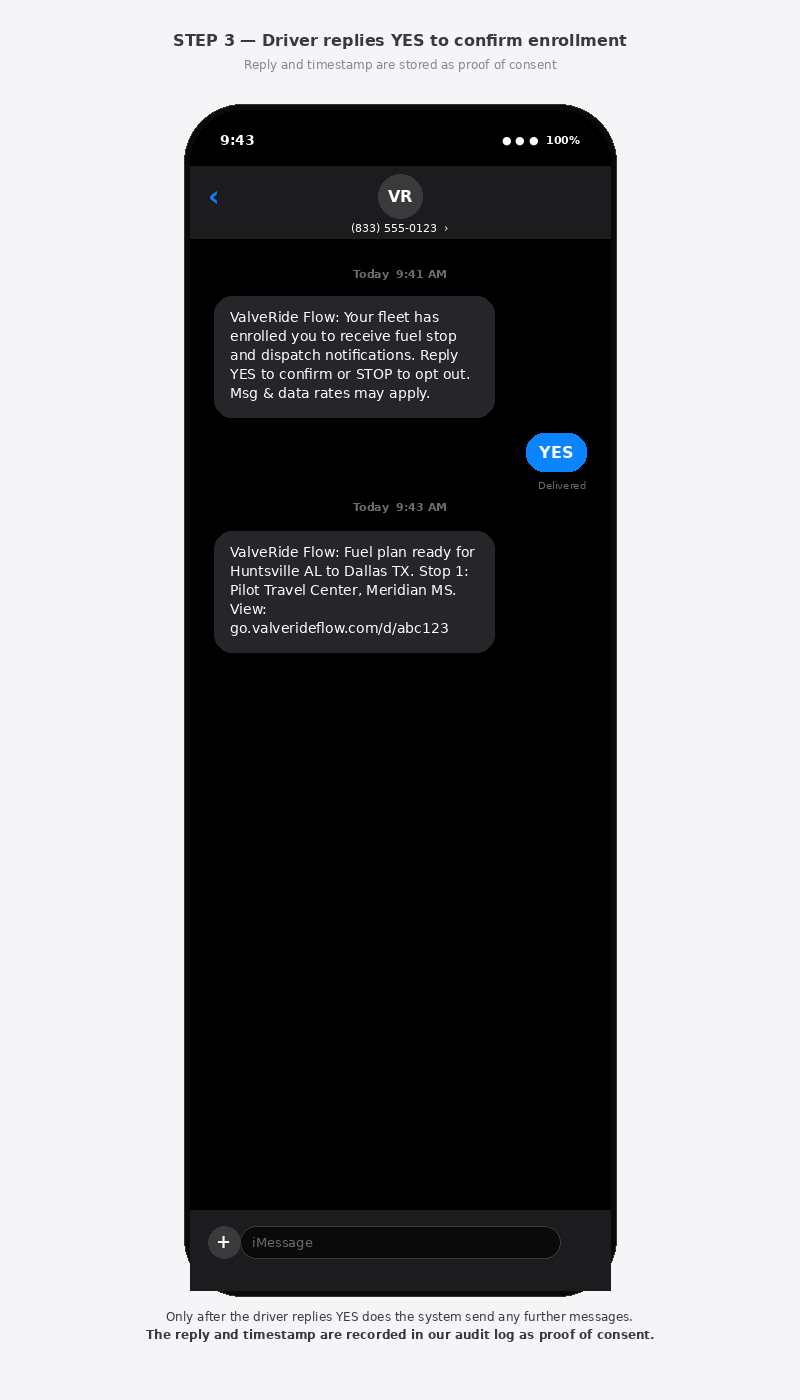
The driver’s YES reply (right, blue) is required before any further messages are sent. The subsequent gray bubble shows a representative transactional fuel plan message.
3. Required Disclosures at the Moment of Consent
At the moment of enrollment, the following disclosures are presented to the dispatcher capturing the number, and to the driver receiving the confirmation SMS:
- The identity of the sender (“ValveRide Flow”).
- The category of messages the recipient will receive (transactional fuel stop and dispatch notifications).
- The opt-out keyword (“STOP”).
- The cost disclosure (“Msg & data rates may apply”).
- A link to this SMS Opt-In policy and to our Privacy Policy.
- An affirmative, unmarked checkbox the dispatcher must check to proceed.
- The driver’s explicit YES reply, captured from the driver’s own handset.
4. What Messages Look Like
All messages are transactional. They contain fuel stop instructions, dispatch information, and price-driven plan updates triggered by an authorized dispatcher. ValveRide Flow does not send marketing, promotional, or solicitation messages of any kind. Representative samples below.
5. Message Frequency
Message frequency varies based on dispatch activity, typically 1 to 3 messages per dispatch. A driver running multiple loads in a day may receive a handful of messages; a driver on rest or layover may receive none. Messages are sent only when triggered by a dispatcher action or a price-driven replan event. There are no scheduled or automated broadcasts and no marketing messages.
6. Cost
ValveRide Flow does not charge drivers for SMS messages. Standard message and data rates from the driver’s mobile carrier may apply. This disclosure is repeated in the opt-in confirmation message and in every campaign communication.
7. How Drivers Opt Out
A driver may opt out at any time by replying with any of the following keywords to any ValveRide Flow message:
Upon receiving an opt-out keyword, ValveRide Flow immediately stops all messages to that number and sends a single confirmation:
A driver who has opted out can re-enroll at any time by asking their dispatcher to re-add them, which restarts the YES-confirmation flow. Drivers may also reply START to resubscribe after opting out.
8. Help Keyword
Replying HELP or INFO to any ValveRide Flow message returns the following help message:
9. Mobile Information & Privacy
Mobile phone numbers and SMS opt-in consent data are not shared with third parties or affiliates for marketing or promotional purposes. We do not sell driver mobile numbers under any circumstances. Mobile information is used solely to deliver the transactional fuel and dispatch messages described above. SMS data flows through our messaging carrier (Twilio) for the sole purpose of message delivery and is governed by our Privacy Policy.
10. Contact & Support
For questions about SMS messaging, opt-in records, or to request manual removal of a phone number from our records, contact:
ValveRide, LLC
support@valverideflow.com
Related policies: Privacy Policy · Terms of Service